About button pins
For various reasons, I have gotten to design button pins, print them and press them. I don't have a store or anything, it's more of a collective thing. For privacy's sake I would rather not show the designs, but there are still some things I want to talk about!
The button-making machine
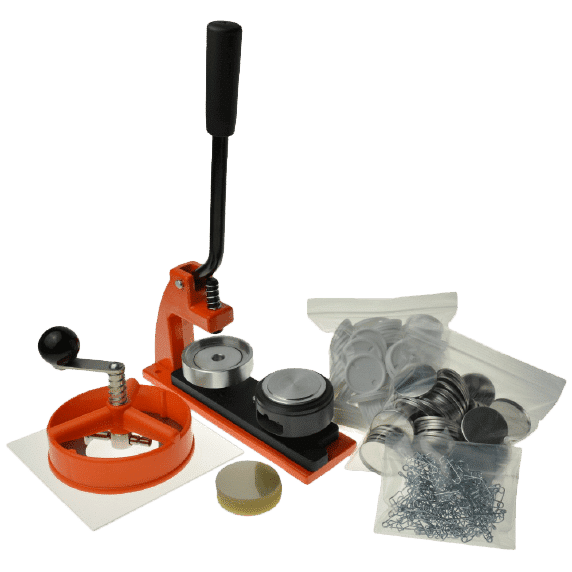
The machine I use has a plate (here in black) with two slots for various button pin components, and a lever to press the upper part down on those slots. On this image there's a paper cutter to cut the badges in the right size, but I don't have that. Scissors work just fine!
The way it works is:
- In the first slot, put in that order: front backing, paper with your design, transparent plastic sheet.
- Insert the safety pin into the back backing and put the back backing in the second slot upside down (prickly part of the safety pin downwards).
- Rotate the plate to place the first slot under the upper part.
- Press down the lever all the way.
- Put the lever back in the original position. The button pin should have been picked up here.
- Rotate the plate to place the second slot under the upper part.
- Press down the lever all the way.
- Put the lever back in the original position. The button pin should have been released here.
- Rotate the plate again and take your button pin :p
Step 3 may vary on your machine (some need to slide the plate instead of rotating it). With practice, it takes me about 20 seconds per badge.
There are some caveats:
- Even if everything is done perfectly, some pins will get messed up.
- If any of the backings are bent, even slightly, the machine may not be able to press down on them.
- The back should preferably be in the correct orientation relative to the front so once both parts are attached, the safety pin is aligned to the design. Because the plate rotates, one needs to figure out how to place it. In my case, it's opposite from the design. Other machines can have other orientations, and even machines with a sliding plate may rotate the pin.
My rate of messed up pins was 1 in 10 when I started and is now a couple in a batch of 50. Most often, the plastic sheet gets messed up, leaving the badge with no protection but a nice matte look.
Printing
A regular printer with regular ink is just fine, even if there are some streaks. People have told me the badges are nice quality even when the printer did a garbage job.
You need to print about a centimeter of margin around the button pin diameter so the paper can get pinched between the two backings. Check the specific margin for your model. A little bit of that area will be visible!
You can print as many badges per page as will fit!
Design
The designs can be made in any vector software that can output PDFs.
Some tips:
- If your goal is to make pins that can be read from afar, an easy good design is to put on a high contrast image surrounded by very short text in a big font. A bit more text in a smaller font can be added on the rim if you do need to say a bit more. This doesn't prevent using colors (preferably high-contrast, flat colors) or photos (preferably converted to pure black & white with the relevant parts highlighted)
- Do not add a border line around the rim, it makes even slight misalignment obvious. However, changing the background color beyond the rim looks really nice and doesn't make misalignment as obvious.
- Letting the design go past the rim makes a nice effect if your design happens to allow it!
Production costs
Ok, let's be honest. How much is a pin worth?
Let's go with 56mm button pins.
- A good quality machine for that button size is worth 250€.
- A pack of 500 button pins' worth of metal front backings, metal back backings, safety pins and protective plastic sheets is worth 90€.
- The cheapest home office printer I could find is worth 55€, initial ink cartridges included. It can print up to 5.5 pages per minute.
- A ream of 500 A4 sheets of paper (80g/m²) is worth 3.89€.
- Minimum wage in my juridication is 9.40€ an hour. Let's double it to 18.80€ to account for taxes, social contributions and healthcare stuff.
Initial investment: 398.89€
I am not counting time spent designing pins because this depends a lot on the design. I will however count time spent printing, cutting and pressing pins.
For printing, a A4 sheet can fit twelve 56mm pins at most, meaning it would take printing 42 sheets to make 500 pins, which would take 8 minutes to print if printed all at once.
It took me about 30 seconds just now to cut about a 7cm diameter circle in a piece of paper, which makes it 4 hours and 10 minutes of cutting.
Like I said earlier, it takes me 20 seconds to press a pin, which makes it 2 hours and 46 minutes of pressing pins.
Total working time: 7 hours and 4 minutes, which would cost 132.85€.
Total price of a little less than 500 button pins: 531.74€
Total price of a single button pin: 1.06€
I wanted to give this analysis because sometimes I see button pins going for 5€ and it seems weird? Obviously there's the design but that's still a lot. Also, ordering premade button pins is a lot cheaper, at only 220€ total for 500 badges (presumably using industrial machines).
Storage
Once all is done and I have fifty+ pins to store somewhere, I just keep them in a plastic box with dividers. It works well, except the plastic sheet tends to get scratched by the safety pins of the buttons above. It's not that big of a deal.